Magnetic Rotary Encoder Video
I found a little bit of time today to make a video showing the assembly and first test of the magnetic encoder board that I designed. Check it out!
Saturday, May 19 2012
Electronics, Audio, CNC Machining, and more.
I found a little bit of time today to make a video showing the assembly and first test of the magnetic encoder board that I designed. Check it out!
Sparkly purple packages in the mail always bring good things from Laen inside. These are the magnetic encoder eval boards that I designed about a month ago. As usual, the quality is great. Unfortunately the timing is not ideal, since it’s crunch time at work, and I probably won’ t have time to build these up for a couple more weeks. We’ll see, though – there aren’t a lot of parts on them, so maybe I’ll find a little bit of time sooner!
I got some samples of the nifty looking AS5040 10-bit magnetic rotary encoder IC from Austria Microsystems. I want to do some experiments with these chips to possibly replace the mechanically coupled encoder I was planning to use to measure the spindle speed on my CNC mill. The chips basically have Hall Effect sensors and signal processing internally to automatically detect the rotation of a magnet with very good precision (1024 counts per rotation, or 0.35 degrees per count!). They can run up to 30,000 RPM, so speed is no issue for my application. They can output quadrature like a regular mechanical or optical encoder, commutation signals for brushless motor control, or you can talk to them over a SPI bus. Very cool!
To test out the chip (and possibly actually use it in my applications), I needed a PC board. Laen’s service is a no-brainer when it comes to making a small board, as it’s practically free. Here’s the little board I put together (red is top layer, blue is bottom layer (flipped).
And, if you’re interested, here is the schematic.
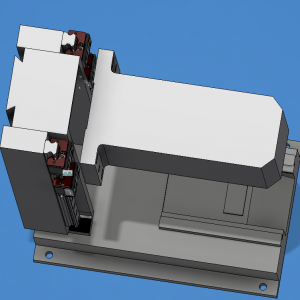
I’ve been slowly working to model the components that go into the CNC milling machine electronics package, and fitting them into an off-the-shelf rack mount enclosure. I think I’m finally settling in on a layout that will work, though I need to put some additional thought into thermal design as there are some components which dissipate some heat.
The front panel has a digital DC voltmeter and an analog ammeter, along with a big chunky emergency stop switch. The stepper drives (shown in red) will be located in the middle bottom of the enclosure. The DC motor driver for the spindle (orange) stands vertically near the rear of the case. The huge linear power supply (beige, with the big toroid) sits off to one side on the bottom. A small PC power supply (gray) rounds out the items on the “floor” of the enclosure.
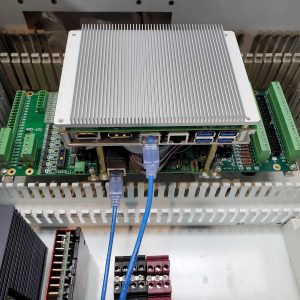
The electronics (green and purple boards) are all mounted on a plate which sits in the upper part of the case, with the connectors for the 3.5″ PC motherboard poking out the back through a plate. The adaptable plate is in case I change motherboards in the future – it’s a lot easier to make a small plate than to remake the whole rear panel of the enclosure. Under that plate are the cutouts for the PC power supply, and the low voltage signal connection to the milling machine, which carries sensor signals. Rounding out the rear panel are four connectors for the stepper motors, and a single connector for the spindle motor.
It’s starting to come together, hopefully I’ll be able to wrap up the design work soon and actually start making some parts!
I have been trying to come up with a good way to attach a rotary encoder to the spindle of my CNC milling machine, so I can have closed-loop control of the spindle speed. I found a potentially good spot in the gearbox where I could possibly mount an encoder, but I’d need to make a coupler.
When coupling two shafts together, it can be very difficult to get them absolutely concentric with one another. If you try to rigidly couple the two, and then rigidly mount both ends, you’re very likely to have binding and will put strain on the bearings that will most likely eventually damage the weakest part.
Several commercial solutions exist which help solve this problem. Oldham couplings, helical (aka ‘beam’) couplings, and others. One issue is that these tend to be pretty expensive. Another issue is that they tend to be suited for larger shafts, and generally are intended to transfer a fair amount of torque (e.g., a motor driving a lead screw). As I was falling asleep, I got to thinking about how I might be able to replicate a helical coupling with stuff I might have lying around the shop, when it occurred to me: why not use a small spring to couple the shafts together?
My application is near zero torque transfer since the encoder shaft is on bearings and spins very freely. This meant that I didn’t need to use a particularly large or robust spring. Conveniently, I have a large assortment of random springs that I purchased at one of the big box home improvement chains, and I picked out a couple of likely candidates and set to work throwing together a prototype.
In short, it shows a lot of promise. It was good lathe practice, to boot. I love coming up with an idea, and being able to prototype and test it over my morning coffee! Here’s a short video showing the construction and testing.
Here’s a quick video I did of my first experiments with drag soldering using a new Metcal hoof tip that I picked up on eBay. This video only shows the technique on Small Outline (SO) packages, which are pretty easy to solder by hand, regardless of technique. With minor alterations in technique, drag soldering works great on finer-pitch parts such as TSOP, QFP, etc.
It turned out to be quite an epic weekend of building boards and getting things up and running. It’s good to be back in the groove with my own electronics projects – it’s been far too long that I’ve been away.
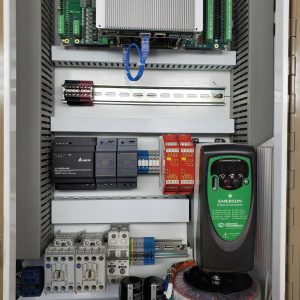
As a wrap-up to the weekend I thought I’d put together a bit of a review video for where the CNC electronics project stands. You can see all of the boards I’ve worked on over the last couple months (and assembled entirely this weekend).
One of the other boards I had in the latest order is an oddball PCI Express 1X riser card, which I could not find commercially. In trying to figure out how to plug a PCI Express parallel port card into my little 3.5″ Atom motherboard, I couldn’t come up with a way to make it work. First of all, Quanmax placed a batter and other obstacles in the way of the PCI Express slot, almost as if they didn’t intend for anyone to ever use it. Secondly, I didn’t really want the connector for the parallel port cart to stick out the back of the case, since it connects internally to the FPGA card. I searched online trying to find a commercial riser card or extender to do what I wanted, but aside from a cheesy ribbon cable extender I got for $5 (and summarily dismissed due to the high cheese factor), I couldn’t find anything.
I realized I had a couple of sample packs around from Sullins, and it so happened that they contained a few varieties of PCIe 1X connectors. I figured I’d try my hand at a design for a riser card that would do exactly what I wanted. I’m pleased to say it works! The PCBs as received required a little bit of cleanup with a file to widen the notch and to chamfer the edges, but other than that, they were ready to go. I booted up the motherboard into Linux and lo and behold, the parallel port card was detected. I still need to do some stress testing on the interface, but that’s a pretty good start!
I populated the machine breakout PCB this morning. This board will actually be installed inside of the CNC milling machine, and the various homing and index sensors will wire to it via the mini-sized green screw terminals. The 40 pin header adapts to a Centronics (old school printer) style plug, and connects back to the main board via a 6′ cable. My design has a significant noise immunity advantage to any other CNC breakout boards that I’ve seen on the market, in that I chose to carry the signals over the interconnect cable using differential signaling. This is a good thing, since the stepper drives/cables are quite noisy. On the (minor) down side, it seems the chips I chose for converting to/from differential are the ones responsible for high current draw. I didn’t catch that the MC3486 receiver chips draw 85mA max, each chip (and I have a bunch in the design). I figured that would only be while switching, but they have a very high quiescent draw as well. They’re a really old design, so that’s probably why they’re so inefficient. At least it’s not a concern in this design since I’ll have a big honking power supply available.
I got my final batch of boards from Laen in the mail today. I had three designs in this batch, so I was pretty anxiously awaiting delivery.
I set right in to populating the main CNC PC board, which I designed almost a month ago. I used a lot of different soldering techniques, and shot a lot of video to share with the class. I used my new hoof tip for my Metcal station to do drag soldering, I put down a bunch of discrete parts with solder paste and my new hot air tool, and I did plenty of classic through-hole soldering. I have to say, while I’m not an expert at drag soldering yet, it’s pretty awesome. Tacky flux paste is freaking magic.
So, here is the populated board. I’ve only powered it on briefly – so far, no magic smoke escaped, and the expected LEDs light up. It’s drawing a bit more current than I seems right, so I need to look into that… Once I check it out a bit, I’ll be hooking it up to the FPGA card and hopefully moving some stepper motors again, since my milling machine has been idle and in pieces since December!